
Traffic Cloaking
How to Stay Invisible and Avoid Social Media Bans
In a world where platforms like Meta, Instagram, Threads, Reddit, and TikTok are tightening their link policies, the more visible your links are to scanners, the higher the risk of getting flagged or banned.
For creators, marketers, and affiliates operating in competitive or gray areas, traffic cloaking is no longer optional. It’s essential.
What Is Traffic Cloaking?
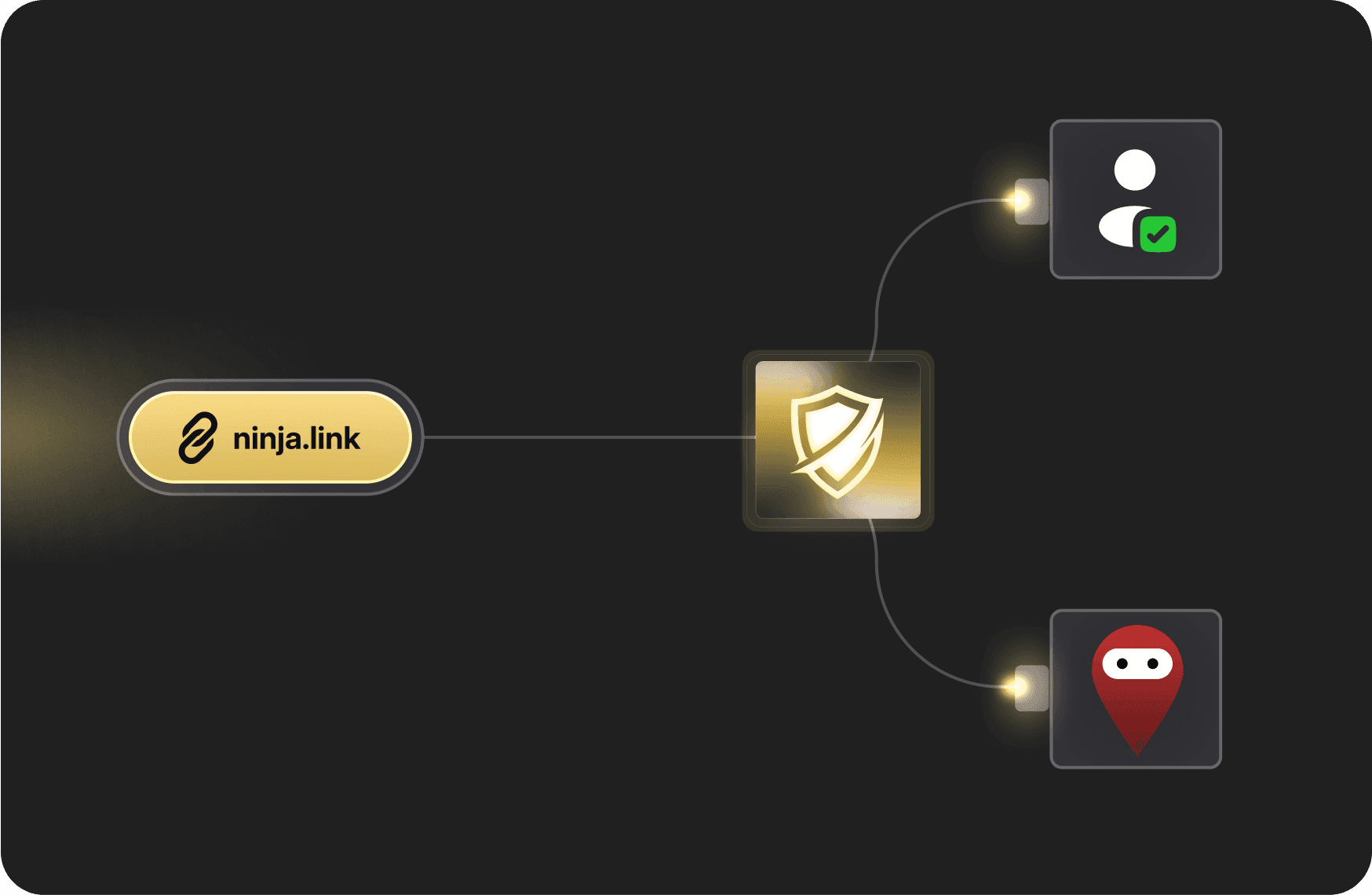
Traffic cloaking is a method of filtering incoming traffic based on who (or what) is requesting the content, then showing them different destinations accordingly.
Real users (your audience): see the actual destination page
Bots, crawlers, and reviewers: are served a "safe" page or will see a 404 page.
This tactic is widely used for:
Protecting campaigns from platform bans (e.g., Meta, TikTok, Instagram)
Preventing moderation systems from seeing non-compliant content
Preserving ad account health and domain reputation
Gaining full control over who sees what
When done right, cloaking isn’t a trick, it’s a smart defense mechanism.
Why Cloaking Matters Now More Than Ever
While Ninja Link cloaking dramatically reduces the risk of getting banned, it doesn’t make you untouchable. No tool can promise invincibility, but it can promise longevity. The goal isn’t to cheat the system, it’s to survive it longer, smarter, and cleaner.
Major platforms are constantly updating their detection methods:
Meta bans links they flag as "low quality" or "non-compliant"
TikTok and Threads restrict redirect behavior
Reddit block URLs with certain behaviors or footprints
Even if your content is legitimate, automated scanning bots can misclassify your page, triggering false positives.
→ Without cloaking:
Links can be flagged as spam
Ads may get disapproved or accounts suspended
Organic posts may lose visibility or get shadowbanned
With cloaking, your links become nearly invisible to scanners, while remaining accessible and fast for real users.
How Cloaking Differs From Redirects and Traditional Link Tools
Most link shorteners and redirect tools are designed to send users from Point A to Point B. They don’t inspect who’s clicking or why. They simply forward the traffic without question.
Cloaking adds a decision layer.
It filters traffic before forwarding it, analyzing whether the click comes from a human, a bot, or a platform scanner.
Here's a quick comparison of traditional redirect tools compare to cloaking:
URL Shorteners: You just short the length of a URL and send users and bots to the same destination. Suspicious activity (bots or moderators) are not filtered.
Landing page builders: You can create a link on a traditional landing page tool with all your links on it. People have an extra click to go to the final destination. It adds friction and visual clutter.
Link Cloakers: You create a redirection wherever you want. The link will send real users to your final destination and bots will see a 404 page (or fallback URL).
Cloaking isn’t about where you redirect. It’s about who gets redirected — and what they see.
What Happens When Someone Clicks a Cloaked Link?
Let’s break down the flow:
A user or bot clicks your Ninja Link.
The cloaking engine performs a real-time fingerprint analysis:
IP origin
Device type
User-agent and browser metadata
Known bot databases
Based on that profile, Ninja Link makes a decision:
If it’s a scanner or bot → show the fallback (safe) page or redirect
If it’s a real user → send directly to the final destination
The process happens in milliseconds. No load time. No delay.
🧠 Bonus: You can route based on additional logic (geo, device, source) at the same time — it all works together.
How Ninja Link’s Cloaking Works
Ninja Link uses a powerful cloaking engine built for stealth, precision, and long-term protection. It blocks bots and scanners by default, serving them a 404 response, or redirecting them to a custom fallback URL for a smoother experience..
1. Fingerprint Filtering
We analyze multiple signals from each visitor to determine whether they’re human or machine:
IP reputation (data centers, proxies, VPNs, TOR nodes)
User-agent patterns (browser, OS, device)
Behavior (mouse movement, speed, JS execution)
2. Real-Time Decision Engine
Based on fingerprinting, Ninja Link dynamically chooses what content to deliver:
Bot detected: Serve a neutral "safe page" or 404 page
Human detected: Serve your real destination
This process happens in milliseconds, invisible to the end user.
3. Geo, Device & Language Filters
Advanced routing rules allow you to further define who sees what:
Redirect by country, city, region
Serve different pages for mobile vs. desktop
Route based on browser language
4. Cookie & Session Awareness
We remember returning users using cookies, which allows us to reduce detection friction and serve destination pages faster without reapplying filters, all while maintaining stealth. Repeat users can be remembered and passed through instantly, reducing friction while keeping protection intact.
Performance Benefits: Not Just About Bans
Cloaking isn’t only about staying live, it’s also about getting better results from the traffic you already have.
Here’s what cloaking improves beyond compliance:
Higher CTR: Real users see optimized offers. Bots see nothing.
Lower CPC: Ads waste fewer clicks on scanners or fraud.
Better tracking: You block traffic that corrupts your analytics.
Faster funnel speed: No friction, no extra pages.
Cleaner data: Analytics reflect actual users, not false hits.
You're not just protecting your campaigns, you're improving every metric that matters.
Use Cases: Real-World Scenarios
By cloaking traffic and filtering bots, Ninja Link helps improve performance. When bots and crawlers are blocked, you don't just stay alive longer, you also avoid paying for clicks that don't convert.
1. Instagram to Fan Platforms
Letting you use a direct link, instead of a landing page aggregator.
Serving a clean fallback to Instagram crawlers to avoid visibility issues.
Giving real users immediate access, faster flow = better conversion.
2. Meta Ads to CPA Offer
Reviewers and bots are sent to a fallback URL or a neutral safe page.
Real users click through to your final high-conversion destination.
You reduce the risk of link bans and save ad budget by avoiding bot clicks.
3. Reddit Post Linking to Niche Store
Your post contains a cloaked link
Reddit scanners see a static safe page
Redditors arrive on the real destination, with tracking intact
4. Threads Story Swipe-Up to Linktree Alternative
Your story contains a Ninja Link cloaked redirect
Platform filters get a neutral page
Your audience gets the full link-in-bio experience
5. Crypto Funnel via Twitter Ads
Twitter bans certain categories, including crypto and NFT offers.
Ninja Link lets you promote a compliant landing page publicly.
Bots see the neutral wrapper. Humans go to your full offer stack.
6. Telegram Group to Paid Course
You share a cloaked link in Telegram.
Link leads to a landing page with upsell offers.
Crawlers see a plain HTML policy page. Followers get the real content.
7. YouTube Description to Affiliate Product
Cloaked link in your video description.
You avoid affiliate link blacklisting or content filtering.
Bots hit a safe dummy page — your audience hits the product directly.
8. Email Newsletter to Funnel
You embed a cloaked URL in your campaign.
Email scanners don’t trigger spam filters with “suspicious” destinations.
You reduce bounce rate and improve inbox delivery.
Is Cloaking Legal or Safe to Use?
Cloaking itself is not illegal. At its core, it’s simply a way to control how traffic is routed and who can reach your final destination. The key factor is how it’s used.
Cloaking is legal in many situations, especially when it serves legitimate purposes such as:
Privacy & Protection → Hiding tracking parameters, protecting your links from bots or scrapers, and keeping your domains safe from abuse.
Affiliate Marketing → Some affiliate programs explicitly allow cloaking, as long as disclosures are respected and rules are followed.
Security / Anti-bot Filtering → Many SaaS platforms (even ad networks) use cloaking-like techniques internally to detect fraud and block harmful traffic.
In these contexts, cloaking works more like a protective layer than a trick. It doesn’t mislead real users and doesn’t harm their browsing experience. On the contrary, it helps by filtering out fake clicks, malicious scans, or automated traffic that would otherwise distort your analytics.
FAQ
Q: Is traffic cloaking allowed in Meta or TikTok ads?
A: The tools are legal. Platforms don’t officially endorse cloaking, but it’s widely used to reduce false disapprovals from bots — not to deceive humans.
Q: Does cloaking slow down my links?
A: No. Ninja Link processes traffic in real time, with no perceptible delay to users.
Q: Can I use cloaking with my own domain?
A: Yes. You can apply cloaking on any custom domain you connect inside Ninja Link.
Q: What if a real user lands on the fallback page?
A: You can design your fallback to still be useful or informative, or route based on behavior. But it's rare — our detection is highly accurate.
Q: Is cloaking a “black hat” tactic?
A: No — unless it’s used to intentionally deceive users. Ninja Link cloaking is used for protection, segmentation, and fraud prevention.
Final Thoughts
Traffic cloaking is not about deception. It’s about protecting your business from broken filters and overzealous moderation.
With Ninja Link, you get:
Built-in cloaking
Real-time detection
Full routing control
One-click setup
Whether you’re promoting a paid offer, protecting a community, or simply surviving Meta’s review systems, Ninja Link gives you the stealth you need to stay alive, safe, and in control.
What our clients are saying
Loved by agencies and creators




Answers to All Your Questions
Get answers to the most common questions.